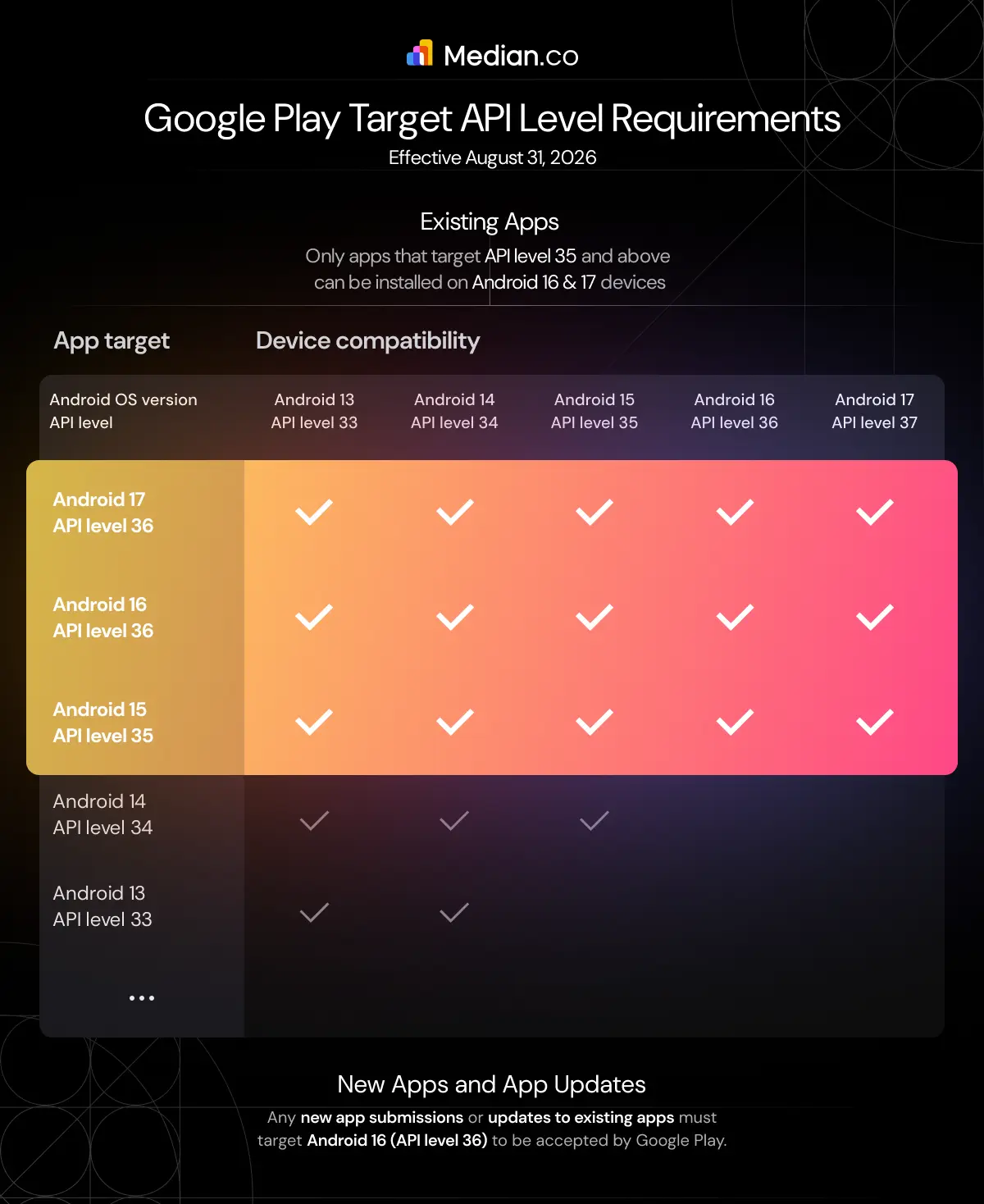
Starting August 31, 2026, new apps and app updates must target Android 16 (API level 36) to be published on Google Play. Existing apps must target Android 15 (API level 35) or higher to remain available to new users on devices running a newer Android version than the app targets. Developers can request an extension until November 1, 2026, to meet these requirements.
Google Play regularly raises its target API level requirements to ensure Android apps take advantage of the latest security protections, privacy features, performance improvements, and platform capabilities.
To keep apps compatible with newer Android releases and available on Google Play, developers must update their apps to target the required Android API level by Google's annual deadlines.
This guide explains the 2026 target API requirements, key deadlines, and what developers need to do to stay compliant.
Try it for free!
Enter your URL to build an Android app
Google Play Target API Requirements for August 31, 2026
Google Play's Target API level policy requires Android apps to target recent Android versions to improve security, privacy, performance, and compatibility with the latest platform features.
Apps that don't meet the required target API level may become unavailable to users on newer Android devices or be blocked from publishing updates.
Existing apps: Starting August 31, 2026, apps already published on Google Play must target Android 15 (API level 35) or higher to remain available to new users on devices running a newer Android version than the app targets (including Android 16 and later).
New apps and app updates: Starting August 31, 2026, all new app submissions and updates to existing apps must target Android 16 (API level 36) or higher to be published on Google Play.
Note: If your app targets an API level below 35, it may not be visible or downloadable on devices running Android 16 or 17 via the Play Store.
If you need more time to update your app, you can request an extension from August 31 to November 1, 2026. Also, note that you'll be able to access a form to apply for an extension for your app later this year in the Google Play Console.
Google Play Target API Level RequirementsGoogle Play Target API Level Exceptions
Some apps are exempt from the standard Target API level requirements. These exceptions include:
Permanently private apps that are restricted to users within a specific organization and intended for internal distribution only.
Apps targeting Android Automotive OS, or apps that include APKs targeting Android Automotive OS.
Wear OS and Android TV apps, which can continue targeting Android 15 (API level 35) or higher for app updates.
Tip: Using a platform like Median can simplify ongoing maintenance by helping you keep your Android app up to date with Google Play's evolving publishing requirements.
How Median helps keep your app compliant with Google Play's Target API requirements
If If your Android app is built with Median App Studio, staying compliant with Google Play's annual Target API level requirements is straightforward.
Median's engineering team keeps the platform up to date with the latest Android SDKs and Google Play requirements, so you don't have to manage Target API changes yourself.
To keep your app compliant with Google Play's 2026 Target API requirements:
Rebuild your app in Median App Studio - If your app was last built before February 2025, rebuild it to use the latest Android SDK and target Android 16 (API level 36). Apps rebuilt since February 2025 already meet this requirement.
Test your app on Android 16 -Verify that your app works as expected, paying particular attention to runtime permissions and any features affected by Android 16. For most apps, Median's browser-based simulators are sufficient, though you may want to test on a physical Android device if your app relies on hardware-specific functionality.
Publish your updated app to Google Play before August 31, 2026 - Once testing is complete, submit the rebuilt app to Google Play to remain compliant with Google's Target API level requirements.
Need help? Median's team can rebuild, test, and publish your app update on your behalf, making it easy to stay compliant with Google Play's evolving requirements.
How to comply with Google Play’s Target API level requirements without Median
If you choose to manage your Android app updates independently, you’ll need to plan for Google Play’s Target API level requirements and ensure your app is compatible with the latest Android platform changes.
To comply with the Google Play Target API level requirement, developers should update their build environment, test their app against the latest Android version, and review the behavior changes introduced in Android 16 (API level 36) before publishing an update.
Key areas to review include:
Core functionality
Predictive back navigation: Android 16 enables predictive back animations for apps targeting API level 36. Apps that customize or intercept back navigation should migrate to Android’s supported back navigation APIs to ensure a consistent user experience.
Edge-to-edge display: Apps targeting Android 16 can no longer disable edge-to-edge display on supported devices. Developers should update layouts to correctly handle system bars, display cutouts, and different screen configurations.
Large-screen compatibility: Android 16 improves support for tablets and foldable devices. Apps should be tested across different screen sizes and aspect ratios to ensure layouts, navigation, and content scale correctly.
Privacy and permissions
Photo and video access: Android 16 introduces changes to photo and video access, including improvements to the system Photo Picker and more user control over app-created media. Apps that manage photos or videos should review the updated media access behavior.
Local network access: Apps that discover or communicate with devices on the local network may need to request the appropriate permissions under Android 16’s updated privacy model.
Health Connect: Health and fitness apps should review the latest Health Connect permission requirements and update their integrations to support the current permission model.
Security
Safer intent handling: Android 16 introduces changes to implicit intent resolution to reduce unintended communication between apps. Developers should review how their app launches and receives intents.
Dynamically loaded code: Apps that load code dynamically, including DEX files or native libraries, must ensure those files are marked as read-only before execution to meet Android 16 security requirements.
User experience and SDK compatibility
Test across devices: Review your app on different Android devices, including phones, tablets, and foldables, to identify compatibility issues before submitting your update.
Review deprecated APIs and behavior changes: Android releases introduce updates to APIs and system behaviors that may affect existing functionality. Developers should review the complete Android 16 behavior changes documentation and address any issues before targeting API level 36.
These are only some of the changes introduced in Android 16. Before updating your app’s target API level, review the full Android 16 behavior changes documentation and test your app thoroughly to ensure it meets Google Play’s requirements.
Note: If your app has not been updated since Android 15 or earlier, you should also review the behavior changes introduced in previous Android versions to identify any additional compatibility issues.
Want to know how it all works?
Get hands-on with Median’s comprehensive documentation, and build your app with ease.
Keep Your App Google Play Compliant Without the Development Headache
With Median’s App Studio platform, our team of experts manages the technical updates required to keep your app aligned with Google Play’s latest API requirements. We handle the complexity behind the scenes so your team can focus on your business — not Android compliance.
Median.co makes app maintenance simpler, faster, and more reliable.
Have a more complex compliance challenge or an enterprise-scale project? Connect with Median’s sales team to explore tailored solutions, discuss your requirements, and find the right approach to keep your apps aligned with Google Play’s latest compliance standards. Book a consultation with our experts today.
Want to learn more about our plugins?
Launch a full-feature native app without native development!
How do I check the Target API level of my current app?
You can check your app’s Target API level directly in the Google Play Console. It will be listed in your app details under the “App integrity” or “Advanced settings” sections.
You can also check it in your app’s source code by opening the AndroidManifest.xml file (or your Gradle configuration, depending on your project setup). Look for the targetSdkVersion attribute, which specifies the Android API level your app targets.
I've uploaded an updated version of my Android app, but the policy warning "App must target Android 16 (API level 36) or higher" is still displayed. How do I fix this?
If you upload a new Android app version targeting Android 16 (API level 36) to Google Play and still see a warning about an incorrect Target API level, it's often due to old APKs/AABs in testing tracks causing the issue. To fix this:
Log in to Google Play Console and select your app.
Go to the Release Management section (Production, Beta, Alpha, or Internal testing).
Check for warning messages and click on them to view details.
Identify old APKs/AABs causing the issue by clicking on "View affecting bundle."
Remove or deactivate these old bundles in the relevant track.
Upload your new release targeting API level 36.
Submit the new release for review.
This process ensures that no outdated bundles cause the API level warning, so you can successfully release your updated app.
*DISCLAIMER: This content is provided solely for informational purposes. It is not exhaustive and may not be relevant for your requirements. While we have obtained and compiled this information from sources we believe to be reliable, we cannot and do not guarantee its accuracy. This content is not to be considered professional advice and does not form a professional relationship of any kind between you and GoNative.io LLC or its affiliates. Median.co is the industry-leading end-to-end solution for developing, publishing, and maintaining native mobile apps for iOS and Android powered by web content. When considering any technology vendor we recommend that you conduct detailed research and "read the fine print" before using their services.*